


T Shirt Design - T Shirts Art
4.6401.00 Reviews
App Specs
- Version
- 2.1.1.1
- Updated On
- License
- Free
- Downloads
- 5,000,000+
- Developer
- o16i Apps
- Categories
- Art & Design
- Platform
- Android
Screenshots
 Analysis by AppCompare
I like to judge a T-shirt design app by what happens after the first burst of inspiration: can I get a rough idea into a readable layout, make a useful revision, and tell whether the result is worth taking further? T Shirt Design - T Shirts Art is aimed at that kind of approachable clothing design. It gives beginners a place to experiment with text and artwork, while its layering and preview tools invite a little more care than simply placing one slogan on a shirt.
Where a simple idea can get stuck
The first hurdle is usually not a lack of creativity but too many choices. A template can help you begin, yet it can also tempt you to add extra text, colors, or graphics before the main idea is clear. I get better results by deciding what the shirt should communicate first, then choosing a layout that supports that message rather than trying to make every available element fit.
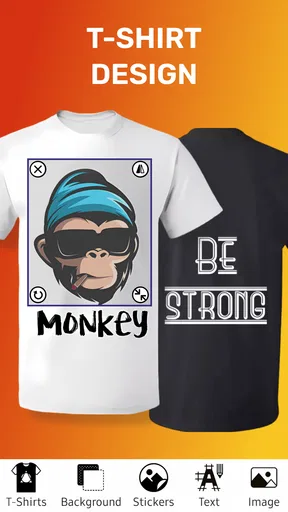
That matters especially for a design meant to be read at a glance. A phrase that looks fine while editing may feel crowded once it is placed on a shirt preview. I would keep the wording short, give the main graphic room, and check the overall balance before spending time on small decorative details. The app’s preview is useful for this visual check, though it should be treated as a design aid rather than a guarantee of how a physical print will look.
Another point where beginners can lose time is imported artwork. Before building a layout around an image, I would make sure the file is the version I actually want to use and that its edges and background suit the design. A graphic that looks clean on its own can feel awkward against a shirt, so try it at the intended size early. That simple test can save a round of rearranging later.
Making a Shirt Design from First Draft to Final Check
First things first, downloading and setting up T Shirt Design - T Shirts Art is a breeze. It’s available on both Android and iOS, so no matter what device you're using, you’re covered. Once you’ve got it installed, you’re greeted with an intuitive interface that’s surprisingly easy to navigate. Trust me, you don’t need to be a tech wizard to figure this one out.
Setup checks before you start
The app is a free art-and-design app from o16i Apps, with in-app purchases available for people who want to explore paid options. Its audience is broad: the content rating is Everyone, and the minimum operating-system requirement is Android 7.0. It has a 4.8 average from around 28,000 ratings and more than 5 million installs, so it has attracted plenty of interest from people looking for a shirt-design tool. It was released on March 19, 2020, and its current version is 2.1.1.1.
Before beginning a project, I’d check that the app is running comfortably on your device and decide what you want to make: a quick personal graphic, a shirt for a group event, or a concept you may want to refine for a small business. Those goals call for different levels of polish. For a casual design, a template and a clear phrase may be enough; for something you plan to show customers, take time to review spacing, artwork quality, and how the composition reads at a distance.
Worth Reading Before You Choose

EA SPORTS FC Mobile 26 Is a Bigger Football Game, but It Takes Time

Flipboard Shows What News Apps Must Do Beyond the Feed

Switching to Android Auto Means Rethinking Your Driving Routine

Google Calendar Makes a Crowded Week Easier to Manage

Ludo King Makes the Most of the Minutes Between Plans

Baby Panda World Brings Quick Play to Modern Phones, but Its Game Library Feels Busy
The app’s template approach is handy when you are staring at a blank canvas, but I would treat templates as starting points rather than finished answers. Pick one that is close to your idea, then adjust its hierarchy: make the key words or image the first thing the eye finds, and remove anything that competes with it. This is a practical way to keep a design personal without making the editing process feel like a full graphic-design lesson.
A Playground of Features
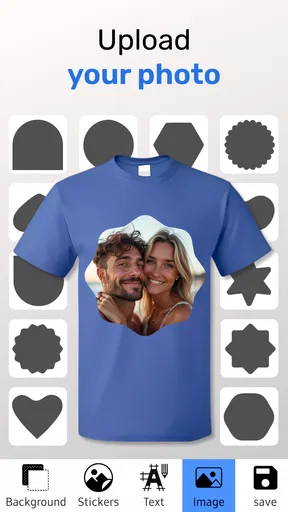
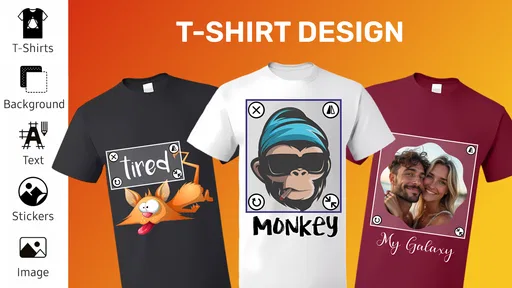
Now, let’s dive into the features because this is where the app really shines. One of my favorite aspects is the layering system. It allows you to add multiple layers to your design, kind of like working in professional design software but without the steep learning curve. This means you can add text, images, and even your own sketches and adjust each layer independently.
That separation is more than a convenience. If a slogan and a graphic are competing for attention, adjusting one layer at a time makes it easier to identify what is causing the clutter. I’d build the design in passes: establish the main element, position supporting text, then add any secondary decoration last. If the result looks busy, removing a layer is often better than shrinking everything until the design becomes hard to read.
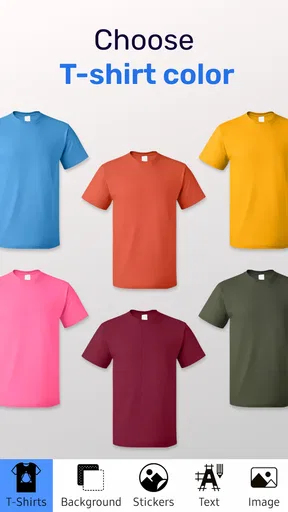
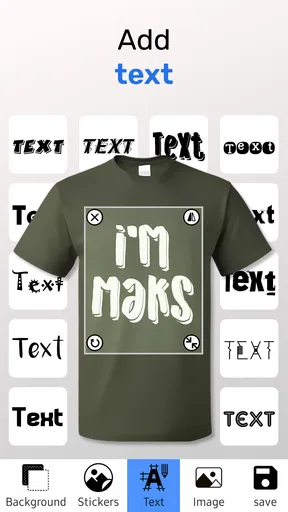
Moreover, the app provides a plethora of fonts and colors. You can customize text to match your vibe, whether you’re feeling bold and bright or cool and understated. And if you’re like me and obsessed with having the perfect color scheme, the color picker tool will be your new best friend.
A useful trade-off is that more choice can mean more time spent polishing details that most people will never notice. I try to limit a first draft to a small set of colors and a font that suits the message, then judge the whole design rather than comparing tiny variations endlessly. This keeps the work focused and makes it easier to spot when a typeface or color is undermining legibility.
Adding Your Personal Touch
What’s a custom t-shirt without a personal touch? The app allows you to upload your own images and artwork. This feature is a game-changer, especially if you have your own logo or graphic that you’ve been itching to put on a shirt. Just upload it, fit it to size, and voila—your design is ready to go!
For a realistic everyday use, imagine putting together shirts for a family outing or a local club meet-up. I’d start with one shared graphic or short phrase, then use the layers to keep the central idea consistent while testing small placement and color changes. That gives everyone a recognizable design without forcing the whole group to settle for a layout that feels cramped. It is also a sensible way to compare drafts before deciding whether the idea is ready to print elsewhere.
There’s also a handy drawing tool for those who want to sketch directly onto the shirt. It’s pretty simple and fun, so even if you’re not the best artist, you can still create something unique and personal.
For a cleaner workflow, I would sketch only the parts that benefit from a handmade feel, such as a simple accent or rough personal mark, rather than trying to draw a complicated illustration on a phone. The drawing tool is best approached as a way to add character to a layout, not as a replacement for dedicated illustration software. If precise curves, detailed edits, or extensive image cleanup are central to your project, another design app may be a better place to prepare the artwork before bringing it into a shirt-focused layout.
Workflow recovery when a draft goes off track
If a design starts to feel wrong, I find it helps to pause and diagnose one thing at a time. First check whether the issue is the wording, the placement, or the artwork itself. Then adjust the corresponding element instead of rebuilding the whole composition. The layering system supports this kind of targeted revision because individual parts can be handled separately.
If an imported image does not sit well, try changing its size and position before adding more decorations to hide the problem. If text is difficult to read, simplify the layout or reconsider the contrast rather than piling on outlines and extra effects. These are general design checks, but they are especially useful here because the app offers enough choices to make over-editing an easy trap.
It is also worth keeping a mental distinction between a mock-up and a production-ready file. The preview can help you judge composition on a shirt, but the final result can depend on the artwork you bring in and the printing process you choose. If you are preparing a design for a real order, inspect the original image and verify the printer’s file requirements before relying on any mock-up as proof of print quality.
When the app is not the cause
Not every frustrating result means the editor is at fault. A source image with a background, rough edges, or limited detail may remain difficult to use even after resizing. Likewise, a design that looks balanced on a screen may need a different placement or scale for the garment and printing method you have in mind. I would check the source artwork and the intended output before repeatedly changing settings in the app.
The same caution applies if your goal is to sell shirts. This app can help you explore a visual concept, but a design tool alone does not settle questions about production, fulfillment, or whether artwork is suitable for commercial use. For a business workflow, I would use it for early composition and compare that process with dedicated design software and the requirements of the printing service. That is a more reliable route than assuming one mobile editor will cover every step from idea to delivery.
Choosing the right tool for the job
Compared with a general-purpose drawing app, this one is more directly focused on putting a design onto a T-shirt, which can make the first draft feel less abstract. A broad illustration or image-editing tool may offer more control for detailed artwork, while a simple template editor may be quicker for a one-line slogan. I see this app as a middle ground: useful when you want to combine shirt-oriented layouts with your own text, images, or sketches, but not necessarily the best choice for advanced illustration or meticulous production preparation.
It is a good fit for casual creators, families planning a matching design, students working on a simple group idea, and anyone who wants to test a shirt concept without starting with desktop software. I would skip it if your priority is highly detailed drawing, deep control over print specifications, or a complete commercial production pipeline. Choosing a more specialized tool in those situations is not a knock on this app; it simply means the job asks for a different kind of control.
Bringing Your Designs to Life
Once you’ve got your masterpiece ready, the app takes it a step further by offering print-on-demand services. Yes, you heard that right. You can have your design printed and delivered straight to your doorstep. It’s convenient and saves you the hassle of finding a separate printing service.
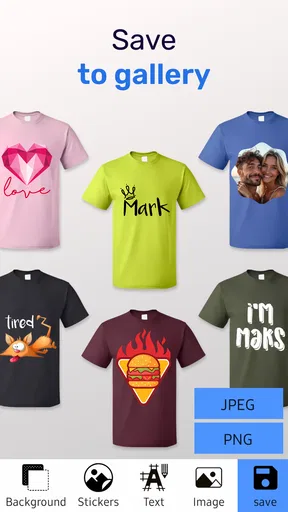
The app also provides a preview feature, allowing you to see what your design will look like on an actual shirt. It’s a nice touch and gives you the confidence that what you see is what you’ll get.
Before committing to a print, I would use the preview to catch obvious composition problems, then review the artwork itself at the size you intend to use. A mock-up is helpful for judging whether a design feels centered and balanced, but it cannot replace checking the actual output requirements of a printer. If you are only experimenting, that distinction is less important; if you are making shirts for an event or customers, a careful final check is time well spent.
Final Thoughts
So, is T Shirt Design - T Shirts Art worth a try? Absolutely. It’s user-friendly, packed with features, and gives you the flexibility to create designs that are uniquely yours. Whether you’re making a one-off shirt for a special occasion or looking to start a t-shirt business, this app has got you covered.
In a world where personalization is key, having a tool that allows you to express your creativity without breaking the bank is invaluable. So, if you’re ready to unleash your inner designer, give this app a whirl. You might just find yourself addicted to the art of t-shirt design!
My practical recommendation is to approach it as a fast way to explore and refine shirt ideas, not as a promise that every draft is automatically ready for professional printing. Start with a clear message, use layers to keep the main elements manageable, and let the preview help you judge the overall composition. The free entry point makes it easy to try, while the in-app purchases mean it is sensible to check what you need before choosing any paid option.
For a beginner who wants a more direct route from a rough idea to a shirt mock-up, that balance is appealing. For a designer who needs fine-grained illustration or production controls, a specialized alternative will likely be more comfortable. I’d recommend giving it a try if your project is personal and visual, with the expectation that a little restraint and a final artwork check will make the biggest difference.
Pros
- Intuitive interface for easy designing.
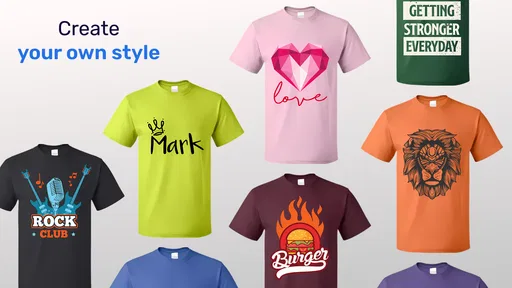
- Wide variety of templates available.
- Supports high-resolution exports.
- Seamless integration with social media.
- Offers a comprehensive color palette.
Cons
- Limited free features in the basic version.
- Occasional lag on older devices.
- Requires internet for all features.
- Some fonts require additional purchase.
- Ads can be intrusive during use.
FAQs for T Shirt Design - T Shirts Art
What features does T Shirt Design - T Shirts Art offer?
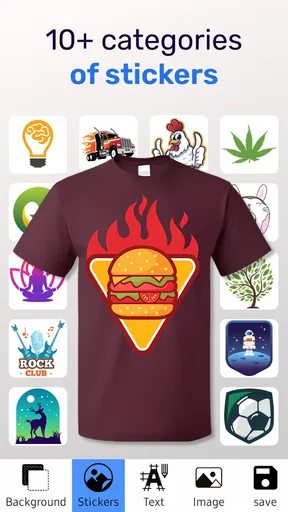
T Shirt Design - T Shirts Art provides a comprehensive suite of tools for creating custom t-shirt designs. Users can access a wide range of templates, fonts, and clipart. The app also supports importing personal images and offers editing tools like resizing, rotating, and color adjustments to perfect your design.
Is T Shirt Design - T Shirts Art user-friendly for beginners?
Yes, the app is designed to be intuitive and user-friendly, even for beginners. It features an easy-to-navigate interface with clear instructions and tutorials to guide new users through the design process. This makes it accessible for anyone looking to create personalized t-shirt designs without prior experience.
Are there in-app purchases or subscriptions required?
While T Shirt Design - T Shirts Art is free to download, it does offer in-app purchases and subscription options. These may include premium design elements, additional fonts, or advanced editing features. However, basic design tools are available without any cost, allowing users to create simple designs for free.
Can I print my designs directly from the app?
The app provides options to export your designs in high-quality formats suitable for printing. You can save your creation and send it to a professional printer or use a compatible at-home printer. Some users also connect with print-on-demand services directly through the app for convenience.
What platforms is T Shirt Design - T Shirts Art available on?
T Shirt Design - T Shirts Art is available for both Android and iOS devices. This cross-platform availability ensures that users can design on the go, whether they are using a smartphone or tablet, making it versatile for different types of devices and operating systems.


